The Lean Designer's Guide to Shipping Better Products, Faster


Streamlining Your Digital Product Design Process for Success
Creating a successful digital product requires more than just a great idea. It demands a well-structured and efficient product design workflow that guides your team from concept to launch smoothly. Streamlining this process can save time, reduce costs, and improve the final product's quality.
Digital product design is a crucial aspect of creating meaningful and functional products in today's tech-driven world. Whether it's a mobile application, a website, or a software solution, mastering the digital product design process will help you create effective designs that not only meet user needs but also excel in user experience. In this post, we'll explore the essential digital design workflows that you need to understand and implement for successful digital product design.

Understanding the Efficient Product Design Workflow
An efficient product design workflow is a systematic approach that organizes tasks, tools, and team collaboration to maximize productivity and creativity. It helps avoid common pitfalls such as miscommunication, redundant work, and missed deadlines.
To build an efficient workflow, start by defining clear roles and responsibilities within your team. For example, assign specific tasks to UX designers, UI designers, developers, and project managers. This clarity prevents overlap and ensures accountability.
Next, adopt tools that facilitate collaboration and version control. Platforms like Figma, Sketch, or Adobe XD allow multiple designers to work simultaneously and track changes in real time. Integrating project management tools such as Jira or Trello can help monitor progress and deadlines effectively.
Regular communication is vital. Schedule daily stand-ups or weekly check-ins to discuss progress, challenges, and next steps. This keeps everyone aligned and allows for quick problem-solving.
Finally, document your workflow processes. Creating a shared knowledge base or design system ensures consistency and speeds up onboarding for new team members.
Key Benefits of Streamlining Your Design Process
Streamlining your design process offers several tangible benefits that directly impact your product's success:
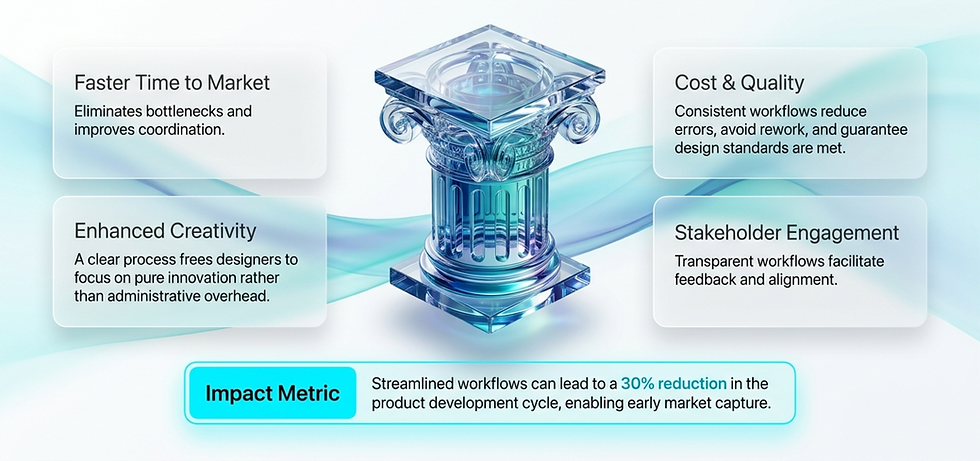
Faster Time to Market By eliminating bottlenecks and improving coordination, your team can deliver products quicker.
Improved Quality Consistent workflows reduce errors and ensure design standards are met.
Cost Efficiency Avoiding rework and delays saves resources.
Enhanced Creativity A clear process frees designers to focus on innovation rather than administrative tasks.
Better Stakeholder Engagement Transparent workflows make it easier to gather feedback and keep stakeholders informed.
For example, a company that implemented a streamlined workflow reduced their product development cycle by 30%, allowing them to launch ahead of competitors and capture market share early.

The Importance of Research in Design
Before jumping into the design phase, thorough research is essential. This phase involves understanding user needs, market trends, and competitor analysis. Engaging with potential users through surveys, interviews, and usability tests will provide valuable insights that can guide your design.
Recent studies indicate that products designed with user research are 2.5 times more successful in terms of user satisfaction. Take the time to explore existing solutions, identify gaps, and understand user pain points. This data-driven approach will empower you to create products that resonate with users.

What are the 7 Steps in the Design Process?
Understanding the fundamental steps in the design process helps in structuring your workflow effectively. Here are the seven essential stages:
Research and Discovery
Gather user insights, market trends, and competitor analysis. This stage sets the foundation for informed design decisions.
Define
Clearly articulate the problem, user needs, and project goals. Create personas and user journey maps to guide design.
Ideate
Brainstorm multiple solutions and concepts. Encourage creativity and explore various approaches.
Prototype
Develop low to high-fidelity prototypes to visualize ideas and test usability.
Test
Conduct user testing to gather feedback and identify issues. Iterate based on findings.
Implement
Collaborate with developers to build the final product, ensuring design fidelity.
Evaluate
After launch, monitor user behavior and performance metrics to inform future improvements.
Following these steps systematically ensures a comprehensive approach that balances creativity with practicality.
Practical Tips to Enhance Your Digital Product Design Process
To further optimize your workflow, consider these actionable recommendations:
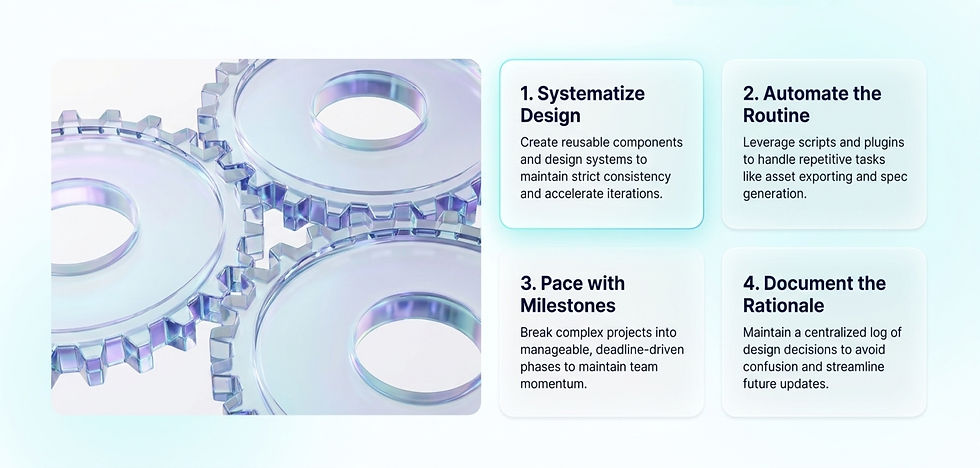
Use Design Systems Create reusable components and style guides to maintain consistency and speed up design iterations.
Automate Repetitive Tasks Leverage plugins and scripts to automate routine work like exporting assets or generating design specs.
Prioritize User Feedback Integrate user testing early and often to catch usability issues before development.
Encourage Cross-Functional Collaboration Involve developers, marketers, and customer support in the design process to align goals and expectations.
Set Clear Milestones Break down the project into manageable phases with deadlines to maintain momentum.
Invest in Training Keep your team updated on the latest design tools and methodologies to stay competitive.
Document Decisions Maintain a log of design choices and rationale to avoid confusion and facilitate future updates.
By applying these tips, your team can work smarter, not harder, and deliver superior digital products.

Best Practices for Designing Digital Products
Emphasize User-Centric Design Always keep the user at the center of your design process. Use their feedback to drive decisions and improvements.
Maintain Consistency Establish a design system that includes components, styles, and branding guidelines. Consistency across the product improves usability and builds brand recognition.
Incorporate Accessibility Consider how users with disabilities will interact with your product. Implementing accessibility features not only broadens your audience but demonstrates social responsibility.
Iterate Based on Feedback Use feedback loops to continuously test and improve your product. Preparing for multiple iterations can lead to a product that more effectively meets user needs.
Stay Updated with Trends Design trends can change rapidly. Regularly update your skills and knowledge to incorporate the latest trends without compromising usability.

Collaborating Effectively With Your Team
Collaboration is a key element of successful digital product design. Engaging cross-functional teams fosters an environment of creativity and innovation. Here are some strategies for ensuring effective collaboration:
Communicate Clearly Establish clear communication channels to facilitate discussions. Consider using project management tools like Trello or Asana to keep everyone on the same page.
Involve Stakeholders Early Engage with stakeholders from the onset of the design process. Their insights can provide invaluable direction and help in aligning product goals.
Conduct Regular Check-Ins Organize regular meetings or check-ins to discuss progress, address roadblocks, and gather input. Keeping the team informed fosters accountability and encourages collaboration.
Utilize Collaborative Tools Leverage collaborative design tools like Figma or Miro, which allow team members to work together in real-time, providing a space for creative brainstorming.

Leveraging Technology to Support Your Workflow
Technology plays a crucial role in streamlining the design process. Here are some tools and platforms that can enhance your workflow:
Collaboration Tools Slack, Microsoft Teams, or Zoom for seamless communication.
Design Platforms Figma, Adobe XD, Sketch for collaborative design and prototyping.
Project Management Jira, Trello, Asana to track tasks and deadlines.
User Testing UserTesting, Lookback.io for gathering real user feedback.
Version Control Abstract or Git integration for managing design versions.
Integrating these tools into your workflow reduces friction and keeps your team connected, even if working remotely.

Enhancing Skills for Better Designs
To consistently produce high-quality designs, it's essential to invest in your skill development. Here are a few ways to enhance your design skills:
Take Online Courses Platforms like Coursera, Udemy, and Skillshare offer courses that range from foundational design principles to advanced UX/UI techniques.
Attend Workshops and Webinars Networking through workshops can provide fresh perspectives and allow you to learn from industry experts.
Join Design Communities Engage with design communities online or locally. Forums like Dribbble, Behance, and Designer Hangout are excellent places to share work, gather feedback, and stay updated on best practices.
Cultivate a Portfolio Build and maintain a portfolio that showcases your design process and the impact of your work. A strong portfolio not only demonstrates your abilities but also acts as a point of reflection for personal growth.
Follow Industry Trends Stay current by reading blogs, watching design videos, and subscribing to newsletters. Understanding market trends ensures your designs remain relevant.

Embracing Continuous Improvement in Your Workflow
Mastering the digital product design process through structured digital design workflows is vital for creating impactful products. Through research, collaboration, user-centered design, and skill enhancement, you can ensure your designs resonate with users and bring your ideas to life. The pursuit of continuous improvement is essential, so always seek feedback, iterate, and refine your work. By implementing these strategies, you will not only enhance your skills but also elevate the success of your digital products.
An efficient product design workflow is not static. It requires ongoing evaluation and refinement. After each project, conduct retrospectives to identify what worked well and what could be improved. Encourage open feedback from all team members.
Track key performance indicators such as time spent on each phase, number of design iterations, and user satisfaction scores. Use this data to make informed adjustments.
Remember, the goal is to create a flexible process that adapts to new challenges and technologies while maintaining high standards.
For more insights on optimizing your digital product design process, explore expert resources and case studies that can inspire your next project.
By focusing on an efficient product design workflow, you set the stage for creating digital products that not only meet user needs but also achieve business goals effectively. Implement these strategies to streamline your process and drive success in your digital product ventures.


Comments